BMW Remote Coding vs USB Activation vs Retrofit Box: Which CarPlay Method Is Best?
There are three ways to get Apple CarPlay on a BMW: native software activation (what Prolazo does), USB-file activation, and a third-party plug-in retrofit box. Native activation unlocks CarPlay directly in your car's own iDrive software, so it runs full-screen through the factory interface with no extra hardware and is permanent. USB-file activation delivers the same kind of native change on certain head units via a file you load from a USB stick. A retrofit box is a separate physical unit wired behind the screen that injects its own menu — the quickest to fit on paper, but it adds lag, a non-factory interface, and hidden hardware. For most BMW, MINI and Supra owners, native software activation is the cleanest result. Prolazo is an independent specialist and is not affiliated with or endorsed by BMW AG.
The three methods at a glance
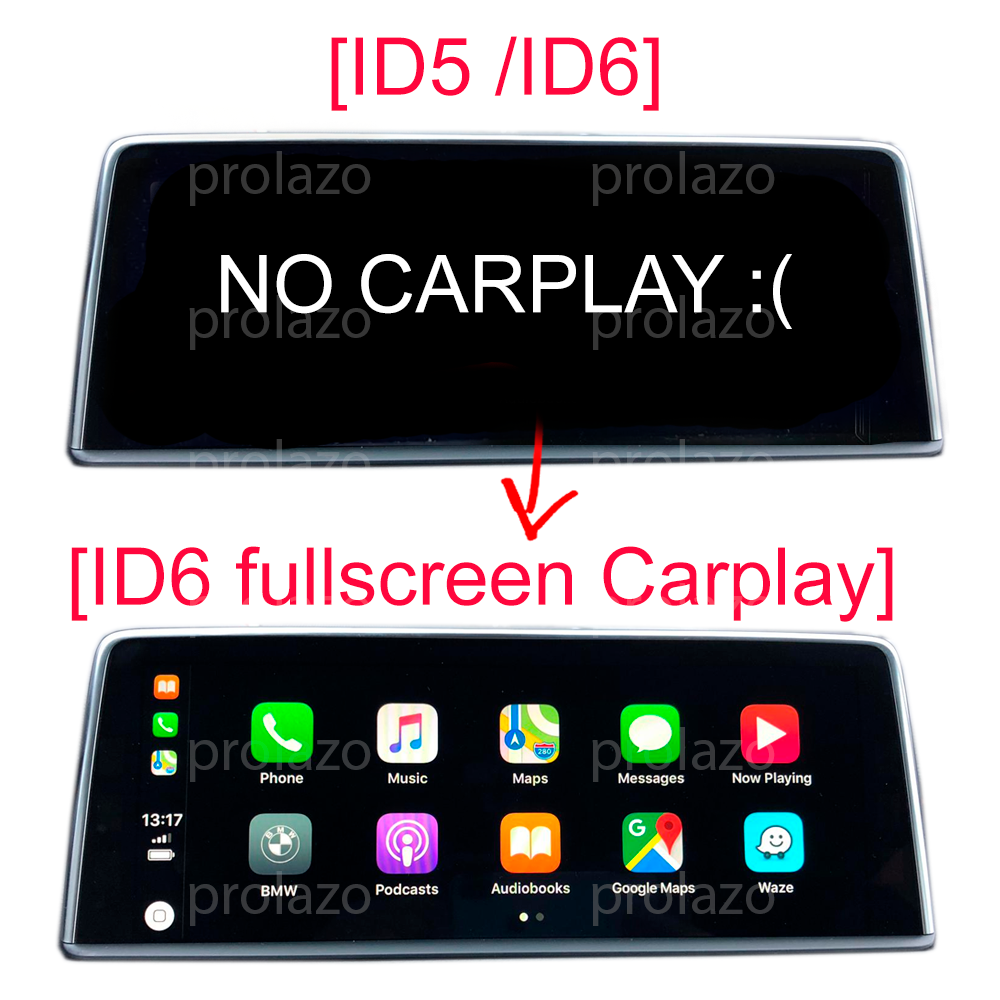
Each method puts CarPlay on your screen in a fundamentally different way, and that difference decides how it looks, how it responds, and whether it survives a software update.
- Native software activation (remote coding): We change your head unit's own configuration so CarPlay is switched on inside the factory software. No parts, no box — the car behaves as if it left the factory with CarPlay enabled.
- USB-file activation: On some head-unit versions the same native result can be applied from a file loaded via USB. It is still a factory-level change, just delivered differently depending on your hardware.
- Third-party retrofit box: A separate aftermarket module is fitted behind the display. It intercepts the video signal and overlays its own CarPlay interface on top of your iDrive.
Prolazo delivers CarPlay through native software activation, performed remotely over an ENET cable or, where supported, by USB file.
Native software activation: how Prolazo does it
Native activation unlocks CarPlay in your BMW's existing iDrive software, so Apple CarPlay appears as a built-in function rather than a bolt-on. Because nothing is intercepting the display, CarPlay runs full-screen through the factory interface, responds at the speed of your own head unit, and leaves every other factory feature untouched.
Most activations are done remotely over an ENET cable: you plug the cable into your car's OBD2 port and your laptop, run our free guided Windows app, and we connect securely over the internet to code the features you chose — no garage visit. On some head-unit versions the change is applied by USB file instead; which route applies depends on your hardware.
The activation is permanent, not a subscription, and it keeps all factory functions. Compatibility is confirmed from your car's real factory build (VIN / SALAPA / FA option codes), not a generic year-and-model lookup, so you know before you buy whether your car supports it. You can check this yourself with our scan-your-car tool.
USB-file activation: same native result, different delivery
USB-file activation produces the same native, factory-level change as remote coding — CarPlay is switched on inside the car's own software — but the file is loaded from a USB stick rather than coded live over a cable. Whether your car uses the USB route or the remote-ENET route depends on your head-unit version and factory build, which is exactly why Prolazo checks compatibility against your VIN first.
The end experience is identical to remote coding: full-screen CarPlay in the factory interface, every original function retained, and a permanent result with no recurring fee. The difference is purely in how the activation reaches your head unit.
Third-party retrofit boxes: the hidden trade-offs
A plug-in retrofit box is an aftermarket module wired in behind your screen that overlays its own CarPlay interface onto the iDrive display. It can be the fastest option to fit on a car that cannot be activated natively, but it carries real downsides that native activation avoids:
- Lag: the box processes and injects its own video feed, which can add noticeable delay versus the factory system reacting directly.
- A separate, non-factory UI: CarPlay lives in the box's own menu, not your BMW's native interface, so the look, controls and switching between sources feel bolted-on rather than built-in.
- Hidden hardware: a physical unit sits behind the dash, drawing power and adding wiring, connectors and another component that can fail.
- Integration gaps: because it sits on top of iDrive rather than inside it, a box may not integrate as cleanly with steering-wheel controls, audio sources or factory menus.
None of this makes a box useless — on genuinely incompatible head units it may be the only path — but where your car supports native activation, you avoid the extra hardware and keep the factory experience.
Which should you choose?
If your car's factory build supports it, native software activation is the better result: full-screen CarPlay in the factory interface, no added hardware, no lag from a signal interceptor, every original function kept, and a one-time permanent change rather than a subscription. USB-file activation is the same native result on head units that take that route. A retrofit box is best treated as the fallback for cars that cannot be activated natively.
The honest answer for any specific car comes from its real factory build. Prolazo confirms compatibility from your VIN, SALAPA and FA option codes before you pay, so there are no surprises. Check your head unit's software version under Navigation > Settings > Position and software version > Software version (NBT EVO units report a value like NBTEVO_Xxxxx) — full-screen support depends on this plus your factory build.
Frequently asked questions
What is the difference between native CarPlay activation and a retrofit box?
Native activation unlocks CarPlay inside your BMW's own iDrive software, so it runs full-screen through the factory interface with no extra hardware. A retrofit box is a separate aftermarket module wired behind the screen that overlays its own CarPlay menu, which can add lag, use a non-factory interface, and introduce hidden hardware that can fail. Where a car supports native activation, it gives the cleaner, more integrated result.
Is Prolazo's CarPlay activation permanent or a subscription?
Prolazo's CarPlay activation is permanent, not a subscription. It is a one-time change to your head unit's own software that switches CarPlay on, and it keeps all factory functions. There is no recurring fee and no hardware that needs to stay plugged in.
Does remote coding require a garage visit?
No. Most Prolazo activations are done remotely: you plug a BMW ENET cable into your car's OBD2 port and your laptop, run the free guided Windows app, and Prolazo connects securely over the internet to code the features you chose. Some head-unit versions are activated by a USB file instead, depending on your hardware.
How do I know if my BMW supports full-screen CarPlay?
Compatibility is confirmed from your car's real factory build — its VIN, SALAPA and FA option codes — rather than a generic year-and-model lookup. You can check your head unit's software version under Navigation > Settings > Position and software version > Software version; NBT EVO units show a value like NBTEVO_Xxxxx, and full-screen support depends on this plus your factory build. Prolazo verifies this for your specific car before you buy.
Is a plug-in CarPlay box ever the right choice?
A third-party retrofit box can be the right choice when a head unit cannot be activated natively, since it may be the only way to add CarPlay to that car. On cars that do support native software activation, a box is usually the weaker option because it adds lag, a separate non-factory interface, and hidden hardware. The best path depends on your car's factory build, which Prolazo checks from your VIN.
Is Prolazo affiliated with BMW?
No. Prolazo is an independent BMW, MINI and Supra specialist and is not affiliated with or endorsed by BMW AG. It provides software activation and retrofit of Apple CarPlay and wireless Android Auto, custom coding, and retrofit parts, with compatibility checked against each car's real factory build.