BMW CarPlay Not Full Screen? Why It Happens and How to Fix It
If your BMW shows Apple CarPlay in a narrow strip down the middle of the screen with black bars or BMW widgets on either side, nothing is broken. BMW deliberately runs CarPlay in a small split-screen window by default on NBT EVO head units (iDrive 5 and iDrive 6). The fix is a full-screen CarPlay activation: a software change to your car's own head unit that lets CarPlay fill the entire display. Prolazo activates this permanently from €24.99, usually remotely over an ENET cable, with all factory functions kept and nothing to plug in or hide.
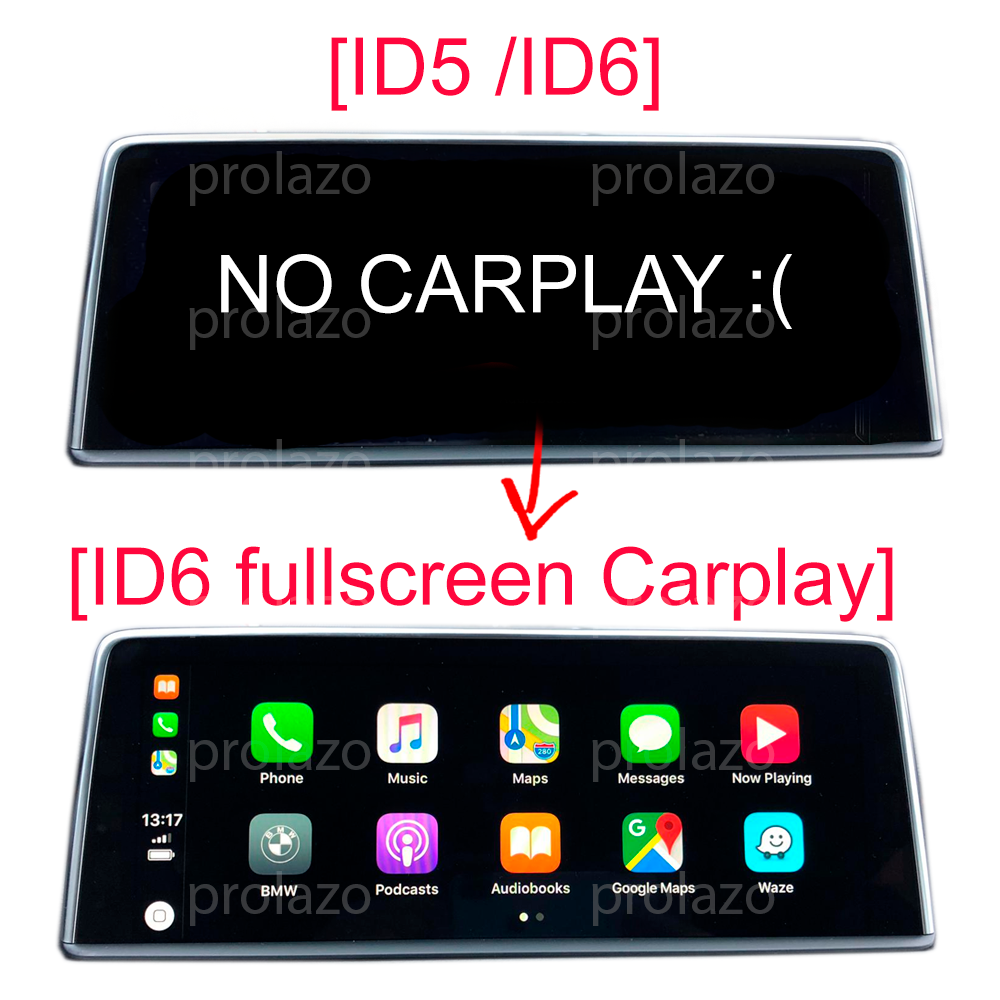
Why BMW CarPlay only shows in a narrow strip
The narrow strip is the factory default, not a fault. BMW's NBT EVO software (iDrive 5 and iDrive 6) renders Apple CarPlay inside a small split-screen window so its own menus and widgets can stay visible beside it. On a wide BMW display this leaves CarPlay looking cramped, with wasted black space or BMW tiles on either side.
Many owners assume they need a new phone, a software update, or an aftermarket box to get the full picture. None of that is the cause. The display area CarPlay is allowed to use is set by the head unit's configuration, so the only real fix is to change that configuration on the head unit itself.
The fix: a full-screen CarPlay activation
Full-screen CarPlay is a native software activation of your car's own head unit. It reconfigures the NBT EVO so Apple CarPlay fills the whole screen instead of the default narrow strip, while keeping every factory function intact. Because it changes the head unit's own settings, there is no adapter, box or dongle to plug in, wire or hide.
Key points about the activation:
- Permanent, not a subscription. It is a genuine retrofit of your head unit that survives software updates.
- Wireless and wired. After the first pairing your iPhone connects wirelessly over Wi-Fi, and wired USB still works too.
- Factory functions kept. Navigation, radio, phone and BMW menus all continue to work normally.
You can see the options and pricing on the full-screen CarPlay activation page. Price is from €24.99 and varies by head-unit version and method, so check the product page for your exact configuration.
Does my BMW support full-screen CarPlay?
Most NBT EVO head units (iDrive 5 or iDrive 6) support full-screen CarPlay, including MINI EVO and the Toyota Supra (J29), which uses a BMW EVO head unit. The exact method depends on your firmware version and the car's real factory build.
To check your firmware, go to Navigation > Settings > Position and software version > Software version on your iDrive. You will see a code that looks like NBTEVO_X (for example NBTEVO_L). This version, combined with your factory build, determines whether and how full-screen CarPlay can be activated.
Rather than relying on a generic year-and-model guess, Prolazo confirms compatibility against your car's real factory build using your VIN and option (SALAPA/FA) codes. You can scan your car or enter your VIN to have compatibility checked before you buy.
How the activation is done
Most activations are carried out remotely. You connect your car to a laptop with an ENET cable and Prolazo guides you through the process step by step over the internet. Some head-unit versions are activated using a USB file instead, depending on the firmware. Either way, you do not need to visit a workshop.
The same remote approach is used for related work such as wireless Android Auto, custom BMW coding and map and region updates, so if you want more than one change it can often be handled in the same session.
Already have split-screen CarPlay? You only need the full-screen step
If CarPlay already works in your BMW but only in the small split-screen view, you do not need a full retrofit. You only need the full-screen activation applied to your existing setup. This is a specific option on the CarPlay activation page (the full-screen-only choice for cars that already have split-screen CarPlay), and compatibility is confirmed from your VIN before anything is applied.
A note on independence
Prolazo is an independent BMW, MINI and Toyota Supra specialist. It is not affiliated with or endorsed by BMW AG. Activations are performed on your own head unit using your car's real factory build data, and all genuine factory functions are preserved.
Frequently asked questions
Why is my BMW CarPlay only showing in a small box instead of full screen?
Because BMW enables CarPlay in a narrow split-screen window by default on NBT EVO head units (iDrive 5 and iDrive 6). It is the factory setting, not a fault. To make CarPlay fill the whole display you need a full-screen CarPlay activation, which reconfigures the head unit so Apple CarPlay uses the entire screen.
Can I make CarPlay full screen on my BMW myself?
Full-screen CarPlay requires changing the head unit's configuration, which is done by activating it against your car's real factory build. Prolazo does this remotely: you connect the car to a laptop with an ENET cable and are guided step by step, or for some firmware versions it is applied via a USB file. You do not need to visit a workshop.
Is full-screen CarPlay permanent or a subscription?
It is permanent. Full-screen CarPlay is a genuine software retrofit of your head unit, not a subscription or temporary unlock, and it survives software updates. All factory functions continue to work normally.
Do I need an adapter or box to get full-screen CarPlay on my BMW?
No. Full-screen CarPlay is a native software activation of your car's own head unit, so there is no adapter, box or dongle to plug in, wire or hide. After activation your iPhone connects wirelessly over Wi-Fi, and wired USB also works.
How do I know if my BMW supports full-screen CarPlay?
Most NBT EVO head units (iDrive 5 or iDrive 6) support it, including MINI EVO and the Toyota Supra J29. Check your firmware under Navigation > Settings > Position and software version > Software version for your NBTEVO_X code. Prolazo confirms compatibility for free from your VIN and factory option codes before you buy.
My BMW already has CarPlay but only split-screen. What do I need?
You only need the full-screen activation applied to your existing setup, not a full retrofit. This is a dedicated option for cars that already have split-screen CarPlay, and compatibility is confirmed from your VIN before anything is applied.