NBT EVO ID5 and ID6 Explained: iDrive Generations, CarPlay and How to Identify Yours
NBT EVO is the BMW/MINI head-unit platform that runs the iDrive interfaces branded ID4, ID5 and ID6, with ID5 and ID6 being the generations most relevant to Apple CarPlay. ID4 is the older tile-free layout, ID5 introduced the split "menu + live tile" look, and ID6 is the refreshed full-tile interface. Whether a given NBT EVO car can run full-screen CarPlay depends on its exact firmware version and factory build, not simply on the ID number shown on screen. This guide explains the generations, which ones support CarPlay and full-screen mode, and how to read your own head unit's version so you know exactly what you have. (Prolazo is an independent specialist and is not affiliated with or endorsed by BMW AG.)
What "NBT EVO" actually means
NBT EVO is the hardware generation of BMW and MINI head unit that succeeded the original NBT. It is the physical computer behind the iDrive screen on a very wide range of BMW and MINI models, plus the Toyota Supra (J29), which shares BMW electronics. "ID4", "ID5" and "ID6" are not different pieces of hardware - they are the software interface generations that run on NBT EVO.
- ID4 - the earliest EVO interface, a simpler menu layout without the large live tiles.
- ID5 - introduced a split layout with a scrollable menu column on the left and a large live information tile on the right.
- ID6 - the refreshed full-tile interface, where the whole home screen is made up of configurable tiles.
Because ID5 and ID6 run on the same EVO hardware, many cars can be moved between interface generations by software - which is why ID5 cars can often be given the ID6 look, and why CarPlay behaviour is tied to firmware rather than to the badge on the screen.
Which generations support CarPlay and full-screen mode
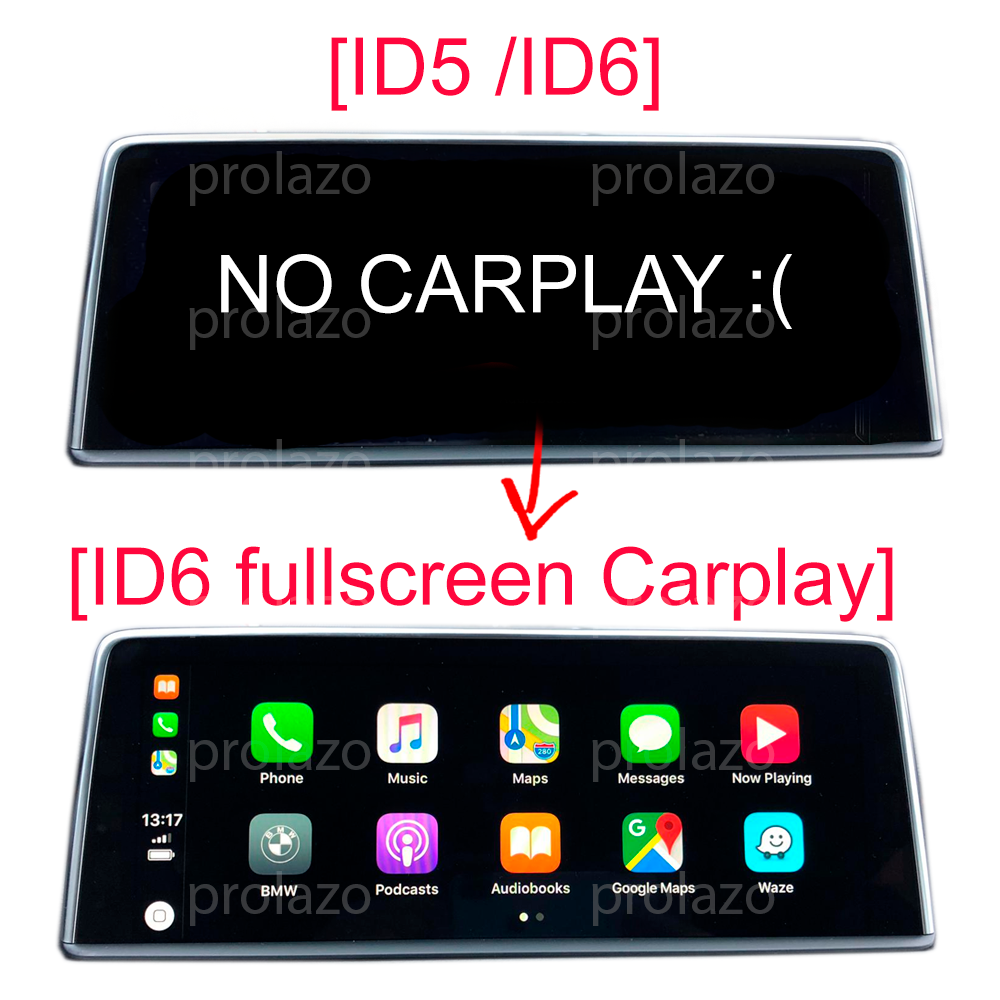
Apple CarPlay can be activated on NBT EVO head units across the ID5 and ID6 generations, and full-screen CarPlay - where CarPlay fills the entire display instead of the narrow strip BMW enables by default - is supported on EVO units too, depending on the exact firmware and factory build. CarPlay is for iPhones; for Android phones, NBT EVO supports screen mirroring (Miracast) rather than Android Auto on these units.
A few practical points matter here:
- Full-screen support is confirmed from the car's real version and build, not assumed from the ID number alone.
- If your car already runs split-screen CarPlay, there is an "only full-screen" option to widen it to the full display.
- On MINI specifically, only certain later EVO firmware versions support full-screen mode, so the version string is especially important to check.
- Activations are permanent - not a subscription or temporary unlock - and keep all factory iDrive functions.
You can activate full-screen CarPlay through Full-screen CarPlay for NBT EVO. Pricing starts from €24.99 and varies by method and options - see the product page for the exact version that matches your car.
How to identify your NBT EVO generation
To identify your NBT EVO head unit, read its firmware version on the car: go to Navigation > Settings > Position and software version > Software version and look for a code in the form NBTEVO_ followed by a letter (for example NBTEVO_G or NBTEVO_V). That letter indicates where your unit falls in the EVO firmware range and determines both the activation method and whether full-screen mode is available.
As a rough guide to what that version tells us:
- Earlier EVO firmware (around NBTEVO_D–F) is typically handled by remote flashing.
- Mid-range firmware (around NBTEVO_G onward) is activated by USB file or over an ENET cable, depending on the unit.
- On MINI, later firmware (around NBTEVO_V–Z) is what supports full-screen mode.
If your screen shows a Road Map WAY map version instead of an NBTEVO_ code, your car most likely has an EntryNav2 unit rather than NBT EVO - a different platform with its own CarPlay path. The most reliable method is not to guess at all: compatibility is confirmed directly from your VIN and factory option codes.
Why VIN-based checking beats a year/model lookup
Two BMWs of the same year and model can have different head units, different EVO firmware and different factory options, so a generic year/model lookup is not reliable. Prolazo checks compatibility against the car's real factory build - its VIN, SALAPA and FA option codes - rather than a generic table. That confirms the exact head unit, the firmware generation and whether full-screen CarPlay is supported before you buy.
The quickest way to be certain is to enter your VIN for a free compatibility check, or to connect the car and run a scan. The Connect your car (ENET Socket) scan reads the real configuration from the vehicle so there is no guesswork about which activation applies.
How activation works
Most NBT EVO CarPlay activations are done remotely over an ENET cable: you connect a cable between the car and a Windows 10 or 11 laptop (an Ethernet port or a USB-to-Ethernet adapter), and the work is guided step by step over the internet. Some firmware versions are instead activated by a USB file - copying a supplied file from an empty FAT32 USB stick - depending on the head unit. Either way the activation is permanent and your factory iDrive functions are kept.
For Apple CarPlay, start with Full-screen CarPlay for NBT EVO. If you run an Android phone, see Wireless Android Auto. For interface changes such as the ID6 look, map and region updates, or other custom work, the remote coding hub covers it. When in doubt, run a car scan first and let the real build decide.
Frequently asked questions
What is the difference between NBT EVO ID5 and ID6?
ID5 and ID6 are two interface generations that run on the same NBT EVO head-unit hardware in BMW and MINI. ID5 uses a split layout with a menu column and one large live tile, while ID6 uses a full-tile home screen. Because they share hardware, an ID5 car can often be given the ID6 interface by software, and CarPlay support depends on the firmware version rather than on the ID number itself.
Does NBT EVO support full-screen CarPlay?
Yes, NBT EVO head units can run full-screen Apple CarPlay, where CarPlay fills the whole display instead of the narrow strip BMW enables by default. Support depends on the exact firmware version and the car's factory build, which is confirmed from your VIN before activation. If your car already has split-screen CarPlay, a full-screen-only option can widen it.
How do I find out which NBT EVO version my car has?
On the car, go to Navigation > Settings > Position and software version > Software version and read the code beginning with NBTEVO_ (for example NBTEVO_G or NBTEVO_V). That letter identifies the firmware generation and determines the activation method and full-screen support. If you see a Road Map WAY version instead, the car most likely has an EntryNav2 unit rather than NBT EVO.
Is the CarPlay activation permanent or a subscription?
The CarPlay activation is permanent. It is a one-time software activation on the head unit, not a subscription or temporary unlock, and it survives software and map updates while keeping all factory iDrive functions. Pricing starts from €24.99 depending on the method and options for your specific head unit.
Does NBT EVO support wireless Android Auto?
On NBT EVO head units, Android phones are supported through screen mirroring (Miracast) rather than native Android Auto, while Apple CarPlay is available for iPhones. Wireless Android Auto is offered as a separate activation on supported units - check compatibility from your VIN, since it depends on your car's real factory build and firmware.