Does My BMW Support Full-Screen CarPlay?
Most BMWs built with an NBT EVO head unit (iDrive 5 or iDrive 6) can run full-screen Apple CarPlay once it is activated, while older NBT units and the EntryNav2 are more limited. The quickest way to know for certain is to check your car's real factory build from its VIN rather than guessing by year or model. Below you can identify your iDrive generation on screen, read your NBT EVO firmware code, and confirm fit for free. Prolazo is an independent BMW/MINI specialist and is not affiliated with or endorsed by BMW AG.
The short answer: it depends on your head unit
BMW did not fit the same infotainment computer to every car, and CarPlay support is tied to which unit you have and how it was built at the factory. In practice:
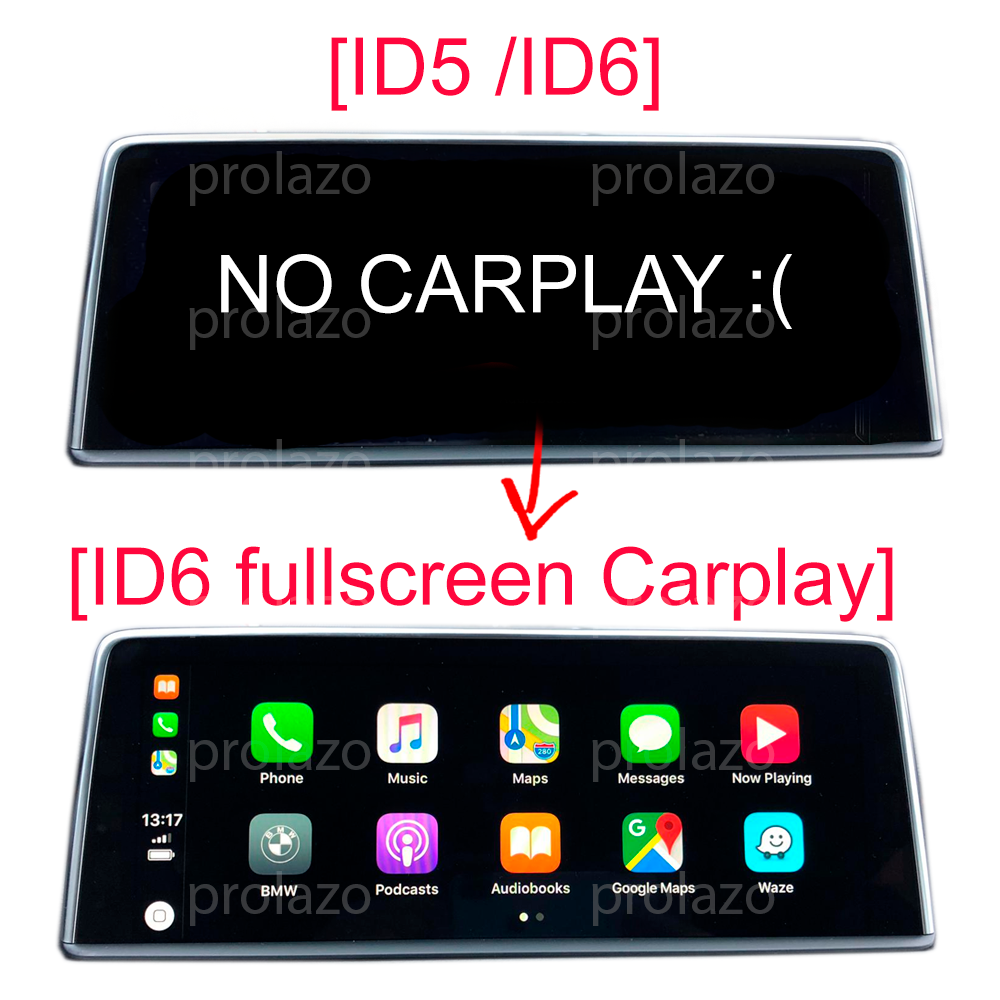
- NBT EVO (iDrive 5 or iDrive 6) — this is the unit that supports full-screen CarPlay filling the whole display, rather than the narrow strip BMW enables by default. Most NBT EVO units qualify.
- NBT (older iDrive) — a different, earlier generation with more limited projection support.
- EntryNav2 — a separate entry-level unit that is not NBT EVO and is handled differently.
Because the exact capability depends on the unit and the factory build, the reliable check is against your car's real option data, not a generic year/model lookup.
Step 1: Tell NBT apart from NBT EVO (iDrive 5/6)
You can usually recognise your generation from the home screen layout:
- iDrive 5 and iDrive 6 use a tile-based menu — large rectangular live tiles across the screen. This is the NBT EVO look and is the one associated with full-screen CarPlay.
- Older iDrive (NBT) uses a simpler list or earlier menu style without the modern live tiles.
iDrive 6 is a newer visual skin of the same NBT EVO hardware, so an iDrive 5 car can often take on the iDrive 6 theme as an option. If you see the tile interface, you most likely have an NBT EVO and should move on to reading the firmware code.
Step 2: Read your NBTEVO firmware code
NBT EVO units report a software version in the form NBTEVO_X (for example NBTEVO_R). To find it on your car:
- Open Navigation > Settings > Position and software version > Software version.
- Note the full code shown, such as NBTEVO_Rxxxxx.
This code, combined with your factory build, determines whether full-screen CarPlay can be activated and by which method. For MINI head units in particular, only the later versions (NBTevo_V, W, X, Y and Z) support fullscreen mode, so the exact letter matters.
Step 3: Confirm with your VIN (the reliable check)
The firmware code and on-screen layout get you most of the way, but the definitive answer comes from your car's factory build — its VIN, SALAPA and FA option codes. This reflects what your specific car actually left the factory with, not what a model could have had.
You can scan your car for free or send your VIN, and compatibility is confirmed against your real build before you buy nothing. If your NBT EVO version is not already listed, Prolazo provides a head-unit scanner tool that runs over an ENET cable so an exact result can be given.
How activation works once it's confirmed
Full-screen CarPlay is enabled as a genuine software activation, not a subscription or temporary unlock. Key points:
- Remote in most cases — most cars are activated over the internet using an ENET cable and a Windows 10/11 laptop, guided step by step. Some versions use a USB file instead, depending on the head unit.
- Permanent — it is a retrofit-style activation that survives software updates, and all factory functions are kept.
- Wireless after pairing — the iPhone connects wirelessly once paired (a WiFi antenna is required), and wired USB also works.
Pricing for full-screen CarPlay starts from €24.99 and varies by method and options — see the product page for your exact version. Prefer Android? Prolazo also offers wireless Android Auto, and broader options through the remote coding hub.
Frequently asked questions
Does my BMW support full-screen CarPlay?
Your BMW supports full-screen Apple CarPlay if it has an NBT EVO head unit (iDrive 5 or iDrive 6) and a compatible factory build. Older NBT units and the EntryNav2 are more limited. The reliable way to confirm is to check your car's real build from its VIN rather than relying on year or model, and Prolazo can confirm this for free.
How do I tell if I have NBT or NBT EVO?
Look at your home screen. NBT EVO (iDrive 5 and iDrive 6) uses a modern tile-based menu with large live tiles, and this is the generation that supports full-screen CarPlay. Older NBT uses a simpler earlier menu style. You can also read the software version in the iDrive settings: an NBT EVO reports a code starting with NBTEVO_.
Where do I find my NBTEVO firmware code?
On an NBT EVO head unit, go to Navigation > Settings > Position and software version > Software version. The code appears in the form NBTEVO_X, for example NBTEVO_R. This code, together with your factory build, determines whether full-screen CarPlay can be activated and by which method.
Will CarPlay fill the whole screen?
Yes, on a compatible NBT EVO the activation enables CarPlay across the entire display, rather than the narrow strip BMW enables by default. The exact result depends on your head unit version and build, which is why compatibility is confirmed from your VIN first.
Is the CarPlay activation permanent?
Yes. Full-screen CarPlay is enabled as a genuine software activation, not a subscription or temporary unlock. It survives software updates and keeps all your factory functions. Most activations are done remotely over an ENET cable with a guided laptop session, while some versions use a USB file.
How can I check compatibility for my exact car?
Check your car's real factory build using its VIN. You can scan your car for free at prolazo.com/scan or send your VIN, and fit is confirmed against your actual build before you buy. If your head unit version is not already listed, a scanner tool run over an ENET cable can give an exact result.